
Pixxlx SaaS Dashboard — Simplified Business Management
Concept Overview
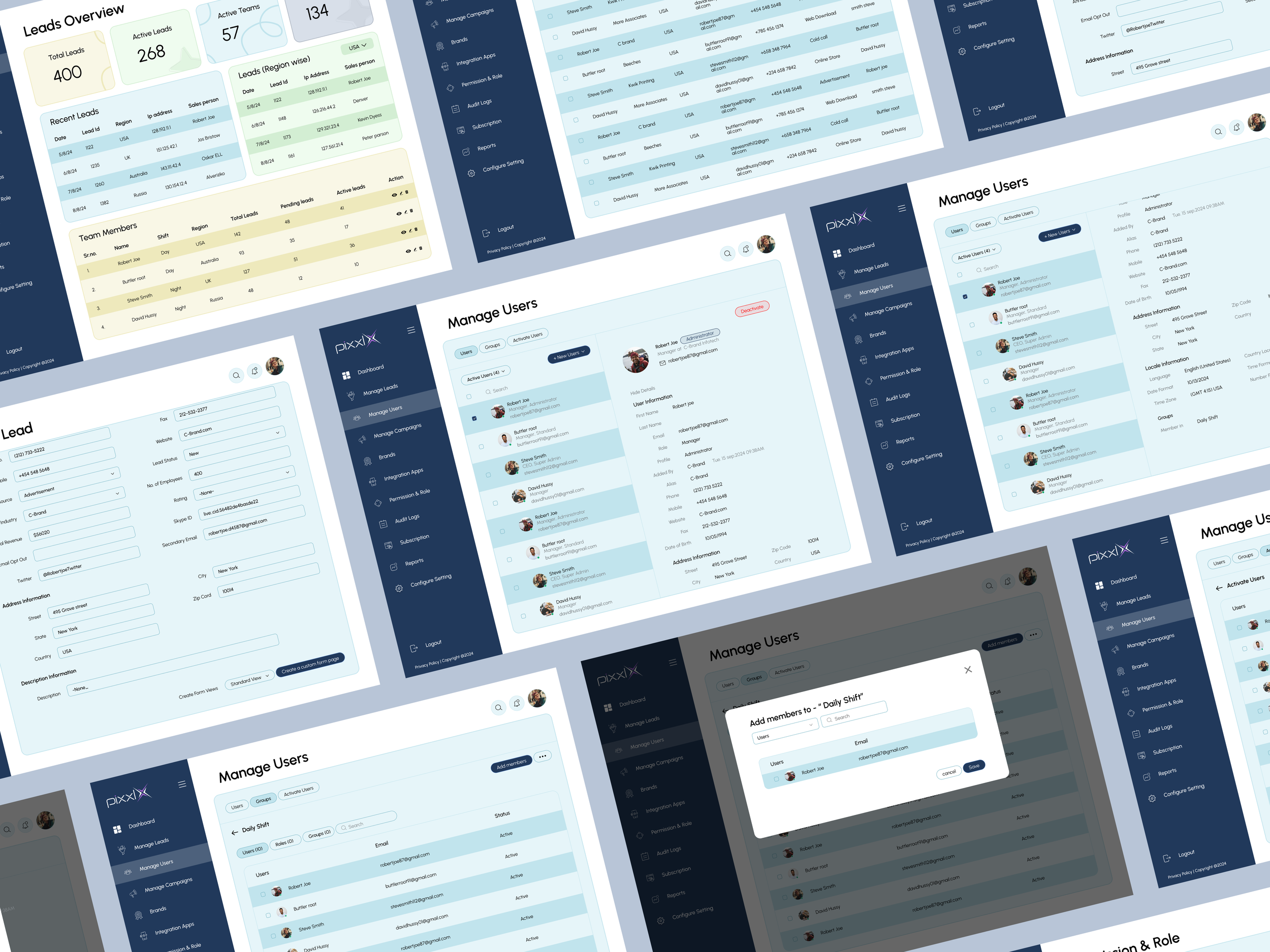
This image showcases a modern and professional dashboard interface design for a business or CRM platform. The layout emphasizes clarity, usability, and data-driven functionality. It includes multiple screens demonstrating features such as lead management, user administration, and team coordination. The design employs a clean and consistent visual language, with a left-side navigation panel for seamless movement between sections like Dashboard, Manage Users, Campaigns, and Reports.
Soft shades of blue and white dominate the color palette, giving the interface a calm and trustworthy aesthetic, suitable for corporate environments. Each page features well-structured tables, input forms, and modals, ensuring users can easily access and manage information. The typography is clear and modern, enhancing readability across different data views. Overall, the design reflects a thoughtfully crafted SaaS application focused on efficiency, collaboration, and user experience, making complex management tasks visually simple and intuitive.
Pixxlx SaaS Dashboard
Role - Experience Designer
Duration - 12 Weeks
Tools - Figma
Team - In collab with Pixxl X team
Problem Statement
Managing leads, user data, and team coordination within growing organizations often becomes fragmented and inefficient due to the use of multiple disconnected tools. Sales and operations teams struggle with limited visibility into lead progress, inconsistent data entry, and a lack of centralized user management. This leads to communication gaps, missed opportunities, and reduced productivity.
There is a clear need for an integrated, user-friendly platform that centralizes lead tracking, user management, and campaign monitoring — enabling teams to collaborate efficiently and make data-driven decisions. The challenge is to design an intuitive interface that balances functionality with simplicity, ensuring users of varying technical skill levels can easily navigate, manage information, and act quickly based on real-time insights.

Research – User Insights and Pain Points
To understand the real challenges faced by pet owners and caretakers/trainers in managing and providing pet care services.
Fragmented Tools and Data Silos:
Users frequently relied on multiple platforms to manage leads, users, and campaigns, causing data inconsistencies and manual duplication of work. They expressed frustration with constantly switching between tools to find relevant information.Lack of Visibility and Tracking:
Many users struggled to monitor lead progress or team performance in real time. Without a unified dashboard, managers lacked quick insights into active leads, team activity, and conversion rates, which slowed decision-making.Complex and Cluttered Interfaces:
Existing systems were often overloaded with unnecessary features, making navigation difficult for non-technical users. Users desired a simpler, cleaner interface that prioritized essential tasks and reduced cognitive load.Limited Collaboration Capabilities:
Communication between team members was often disconnected, with no clear visibility into who was handling specific leads or campaigns. This led to overlaps, missed follow-ups, and accountability issues.Time-Consuming Data Entry:
Sales representatives reported that manual data input was tedious and error-prone, leaving less time for actual client engagement. They requested auto-fill features and smarter input validation to save time.Need for Role-Based Access Control:
Administrators wanted better permission management to control who could view or edit sensitive information. The lack of defined user roles created confusion and security risks.
Insight Summary
Users need a centralized, intuitive, and collaborative management system that simplifies workflows, enhances visibility, and minimizes manual effort. The ideal solution should empower teams with clear insights, easy data handling, and seamless coordination within a single unified platform.
Goals
The goal is to create a centralized and user-friendly management platform that streamlines lead tracking, user management, and team collaboration. The design focuses on improving efficiency, visibility, and ease of use.
Key Goals:
Centralize all leads and user data in one platform.
Provide real-time insights through a clear dashboard.
Simplify navigation and data entry for all user types.
Enhance team collaboration and accountability.
Ensure data security with role-based access.
Overall, the aim is to deliver a clean, efficient, and scalable system that boosts productivity and user satisfaction.

Key Features
-
View, add, and categorize leads by region or status.
Track conversion rates and team assignments.
-
Add, edit, and monitor team members.
Role-based access control for secure operations.
Manage and monitor marketing campaigns from one dashboard.
-
Data visualization for total leads, active users, and performance tracking.
-
Keep track of user activity and access levels for transparency.
Style Guide

Key Takeaways
Users need a centralized system to manage leads, users, and campaigns efficiently.
A clean and intuitive interface greatly improves user adoption and reduces training time.
Real-time insights and dashboards empower managers to make data-driven decisions quickly.
Collaboration tools and clear user roles enhance teamwork and accountability.
Automating repetitive tasks like data entry saves time and reduces human error.
Conclusion
The project successfully identifies the need for a unified and user-focused management platform that simplifies complex workflows and improves organizational efficiency. By combining streamlined navigation, real-time analytics, and collaborative features, the design promotes productivity and clarity. The end result is a modern, scalable, and easy-to-use interface that supports both business goals and user satisfaction.